Was this page useful?


Using Google Scholar at Anglia Ruskin

Ask UsGoogle Scholar is a powerful service that provides a simple way to broadly search for scholarly literature. You can search across many disciplines and sources: peer-reviewed papers, theses, books, abstracts and articles, from academic publishers, professional societies, preprint repositories, universities and other scholarly organizations. Google Scholar helps you identify the most relevant research across the world of scholarly research.

The University Library has now registered its holdings with Google. So it's now possible to search Google Scholar and link directly to the full text of journal articles where they are available at Anglia Ruskin.

Please note the following:

1) If you want to use Google Scholar in this way you MUST always first be logged in to the Anglia Ruskin Digital Library website.

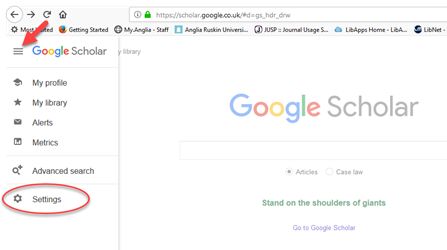
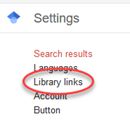
2) Anglia Ruskin must be activated as your Google Scholar Library Link. If you are accessing Google Scholar from anywhere on the Anglia Ruskin campuses this should be enabled automatically but in case of difficulties you may need to check your settings as shown below. Please note: If you are accessing from our Fulbourn or Peterborough sites or from home you will certainly need to do the following:

  • Go to Google Scholar preferences
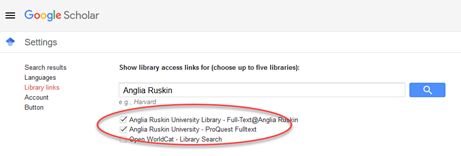
  • Enter "Anglia Ruskin" in the Library Links Search Box
Library Links box
  • Check the Anglia Ruskin University Library (Full-Text@Anglia Ruskin) option
  • If you are a RefWorks (Citation Manager) user, in Google Scholar preferences  you can select the "Show links to import citations into RefWorks" option from the Bibliography Manager drop down menu  (see picture below)
  • Save preferences
Selecting RefWorks

3) Once you are logged in to the University Library  you can enter Google Scholar either directly or via the Google Scholar link in the Digital Library. Under the Advanced Search click on Database Finder search for Google Scholar. To search Google Scholar either click on the magnifying glass symbol (to search within the Digital Library interface) or alternatively click on 'Google Scholar' to search within the Google Scholar interface.
Magnifying glass symbol

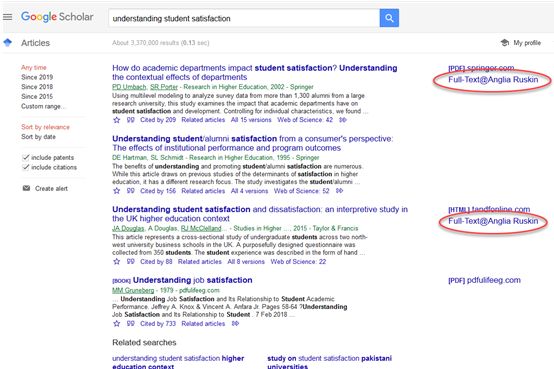
After you have completed a Google Scholar search you will notice the following links added to many result items:

1) Full-Text@Anglia Ruskin -clicking on this link will take you via a "SFX" window to the full-text document

Full text at Anglia Ruskin

2) Links@Anglia Ruskin - this will indicate that in most cases the full-text is not available in our Digital Library. Ususally this will indicate that the Library has a physical copy of a book, for example

Links at Anglia Ruskin

Documents that don't carry any link won't be available directly from us but can be obtained through our interlibrary loans service.


Revised by NB 8/09